


Sign in

Default permissions

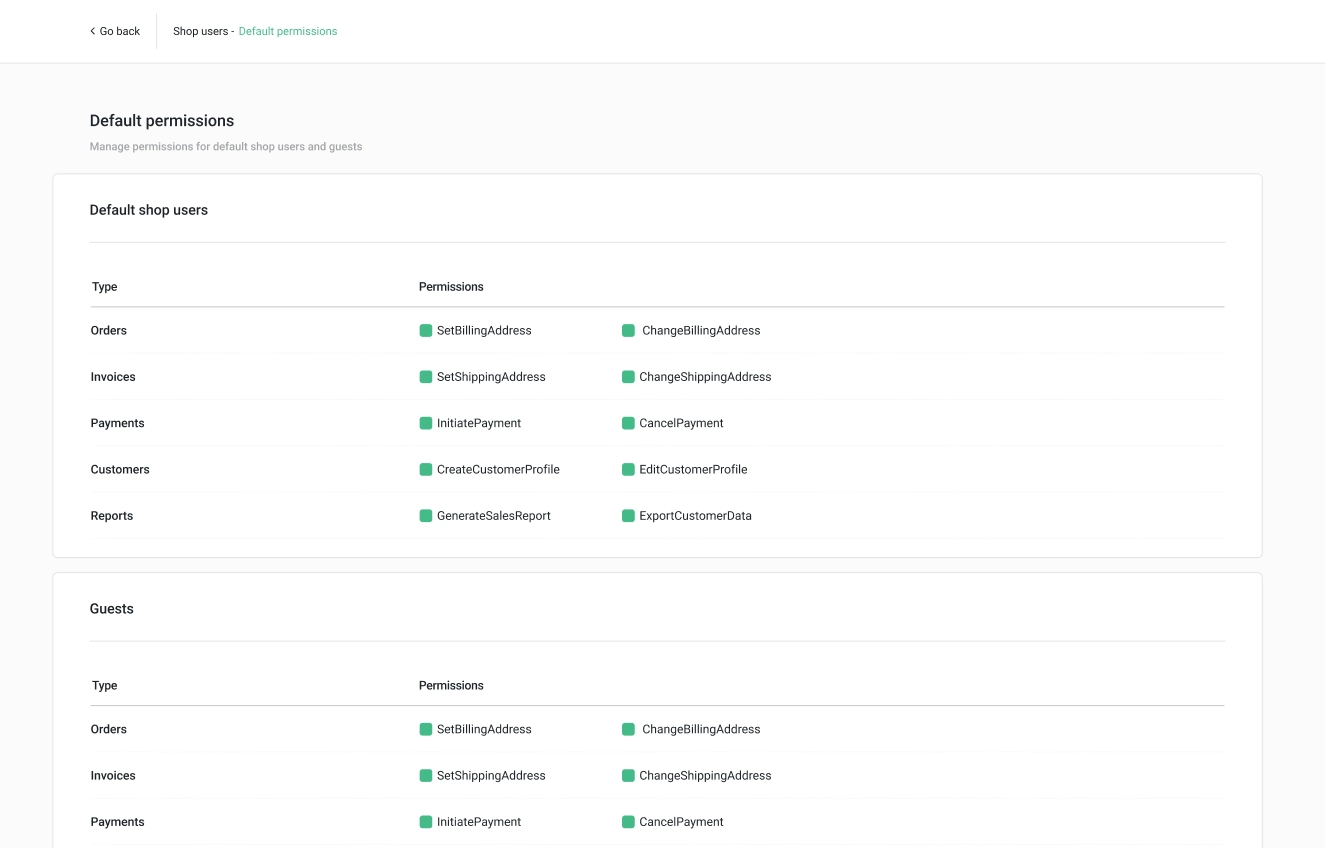
With the “Default permissions” feature, you can define and manage what users are allowed to perform specific actions in a shop.

Permissions can be configured based on types of users including “Default shop users”, “Guests” and custom “Shop user types”.

To configure the permissions for custom “Shop user types”, please follow the instructions in Shop user types.


Who are Default shop users and Guests?

Basically, oneCORE distinguishes these two default user types based on registration status:

        - Default shop users are visitors who have registered an account but do not have a custom Shop user type assigned.

        - Guests are the visitors who have NOT registered an account.

As a result, the Default permissions for Default shop users apply to visitors who are logged in, while the Default permissions for Guests apply to visitors who are not logged in.

bg-big

Configure the permissions

1. Navigate to Default Permissions under Shop user menu.

2. Every available permission will appear, categorized by type. The new permissions will automatically add to Default shop users and Guests, along with other custom shop user types.

3. Mark on a permission to enable the action and unmark to disable the action.


Available permissions 

Type: Orders 

  1. ChangeBillingAddress 

                o If the permission is enabled, the users can change and modify their billing address in an Orderflow. 

                o If the permission is disabled, the users cannot change and modify their billing address in an Orderflow. 


           Note: This permission is not yet applied to Orderflow V2. 

Ready for a change? Find out with our Quickscan!


See instantly if your made-to-order business and our platform are a perfect match.

Book a demo