Orders that reach your ERP with every detail.

Orders come in from your webshop, your dealers and your showroom. oneCORE takes each one through the same steps, as it does for every Barbas dealer order.
  • Webshop, dealer portal and store in one order flow
  • The full configuration on every order line
  • Into your ERP, from receipt to shipment
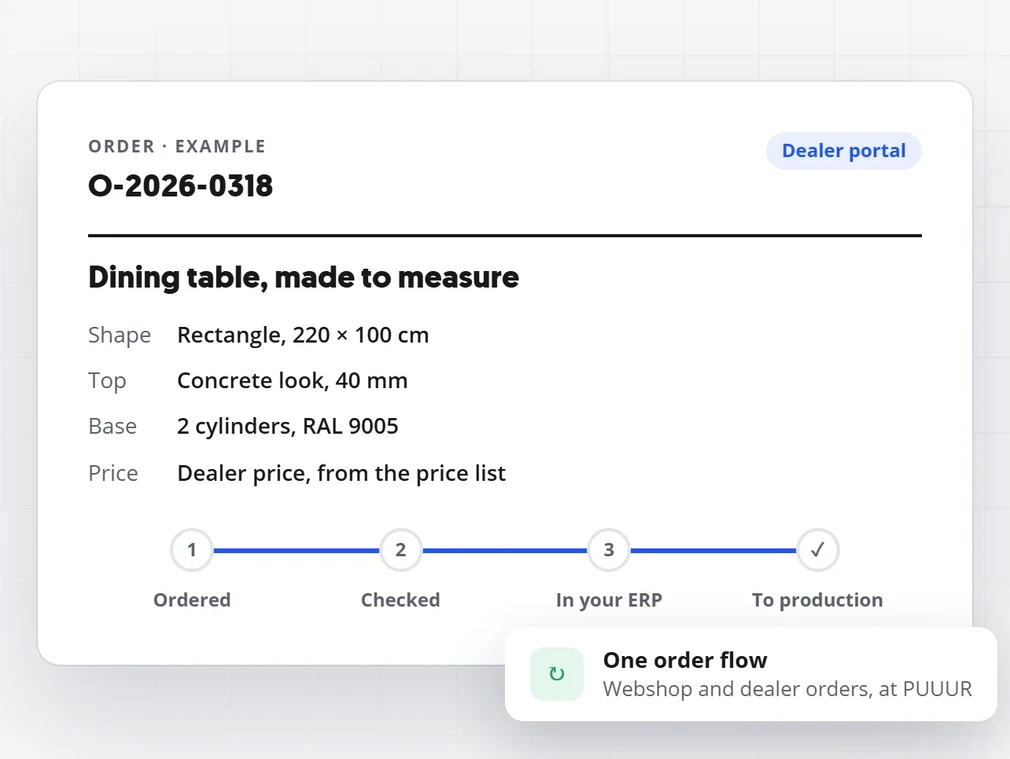
Order of a made-to-measure dining table with its order flow

One order, start to finish

From the first click to the workshop.

What happens to a configured order in oneCORE, wherever it was placed.

  1. Configured

    Placed where your customer is

    On your webshop, in a dealer portal or B2B customer portal, or on a screen in the store. The customer or dealer configures and orders in one go.

  2. Checked and priced

    Your rules, your prices

    Rules decide which options fit together, and the price follows from your own price lists, per customer or dealer where you want.

  3. Handled

    Order flow and logistics

    Paid straight away or on account, with the order fields you choose. The configuration stays on the order line.

  4. Made

    Into your ERP and production

    The order is created in your ERP, and every step from receipt to shipment stays in sync.

Every channel

Webshop, dealers and store share one order flow.

Diagram: an order configured in your webshop goes into your order system with its full configuration
The configuration goes straight into the cart.

On a oneCORE webshop or the one you already have. Bogard kept its WooCommerce webshop: customers design their table online and the finished configuration lands in the cart, then in Bogard's WooCommerce as an order.

Diagram: a dealer portal order goes straight to your ERP, ready to make
Dealers order directly, without emails or phone calls.

Dealers log in, configure your product in 3D, see their price and order directly, paid straight away or on account. At Barbas, every dealer order flows into the Isah ERP and on to production. PUUUR's dealer orders come in through the same platform as its webshop orders.

Diagram: a design from the store screen reaches your order system in one click
Designed and ordered in the store.

At Loods 5, Bogard's configurator runs on a store screen. Each configuration becomes barcodes for the store's own till, and the order lands in Bogard's WooCommerce like any online order. At Different Doors, the door is designed and priced during the sales conversation.

How it works

Faster orders, with fewer errors.

01

No more orders by email or phone.

Orders by email or phone have to be entered again before production can start. In a oneCORE dealer portal, dealers, sales partners and resellers configure your product and order it directly in your system.

  • An easier ordering process for dealers
  • The price, in real time
  • Paid straight away or on account
Before and after: dealer orders by email and phone versus a sales portal

02

Ask only what the order needs.

With Dynamic order fields, you choose which data you ask for and change the fields yourself in the back end, with drag and drop. Smart postal code fields fill in the street and town from the postal code and house number.

  • For the order form, the login and the checkout
  • Fewer clicks before the order is placed
  • Fewer typing errors in addresses
Delivery address form where the postcode fills in the street and city

03

Into your ERP, the moment it's placed.

When a customer orders in oneCORE, the order is created in Microsoft Dynamics 365 Business Central straight away through a Power Automate trigger, and every step from receipt to shipment stays in sync. Odoo works the same way. For more complex work, such as sales orders in your ERP or purchase orders with suppliers, Cloudflare Workers handle it.

  • Business Central and Odoo, out of the box
  • Isah at Barbas, Exact at COOXS, WooCommerce at Bogard
  • Stock and customer data in sync too
Order automation diagram: an order placed in oneCORE goes through Power Automate or Cloudflare Workers into your ERP

Customer story · Fireplaces

Dealer orders, straight into production.

Barbas has built wood and gas fireplaces in Bladel since 1976 and sells them through dealers. In their own oneCORE dealer portal, dealers configure fireplaces, see their prices and order. Each order goes straight into Barbas' Isah ERP, and production follows.

Modern fireplace in a living room

Related

Related solutions.

Quote automation

Automate

Every configuration becomes a quote, in your name.

Explore →

Pricing & workflows

Automate

Price lists, dealer prices and the workflows behind them.

Explore →

ERP & PIM

Connect

Orders, prices and stock in sync with your systems.

Explore →

Dealer portals

Commerce

Dealers configure, quote and order with their own terms.

Explore →

Questions

Orders and oneCORE.

Let every order run straight to production.

Book a 30-minute demo, or try a configurator in 3D first.