
Priced from your own Excel price lists.
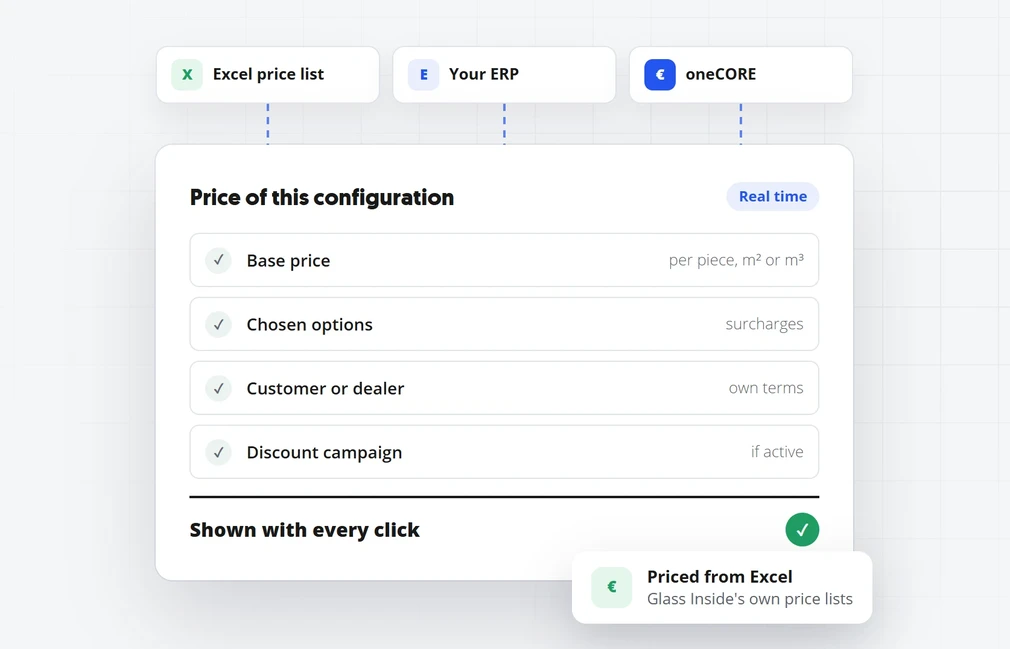
Glass Inside's configurator prices and quotes every glass door from its own Excel price lists. Sales partners who keep a price book in Excel upload it as a CSV file.

Price lists
Complex price structures are standard in oneCORE, so there is no external price tool. Pick the source that suits you.
Glass Inside's configurator prices and quotes every glass door from its own Excel price lists. Sales partners who keep a price book in Excel upload it as a CSV file.

Prefer to manage prices in your ERP, such as Microsoft Dynamics? Cloudflare Workers fetch unit prices, configurable prices and price models directly. Smart caching keeps context-dependent prices available in real time, including models based on materials, staff or specific tasks.

oneCORE has tools for smart, consistent and dynamic pricing of products and their variable options. Prices follow the options, quantities and promotions a customer chooses. At PUUUR, every sale runs on one standardized price structure.
Dealer prices
Customers pay the same price for your product, whichever seller they meet in the showroom. Set it once and every dealer shows it.
Let every dealer use their own pricing in the dealer portal. Dealers log in and see their own prices and terms when they configure and order.
Promotions
Free delivery, free extras or a discount on part of your range: you plan discount campaigns in a calendar view. Choose the products, a discount in euros or as a percentage, and whether it runs once or repeats. Codes can be valid once or many times, and an Excel export shows which orders used which code.
Limited campaigns work with voucher codes: a customer who enters one sees the product editions it unlocks.
Promotions

Workflows
Microsoft Power Automate handles repetitive, simple tasks and comes with every package. For more complex work, oneCORE is extended with Cloudflare Workers: applications around oneCORE that start on events.
When
An order is placed
Then
The order is created in your ERP
Power Automate
When
An order needs parts from a supplier
Then
A purchase order goes out
Cloudflare Workers
When
A price changes in your ERP
Then
The configurator shows it, in real time
Cloudflare Workers
When
A dealer reaches a revenue goal
Then
A voucher code is issued
Power Automate or Cloudflare Workers
When
A customer verifies their phone number
Then
An achievement unlocks features
Account Connect
When
Your rules are specific to you
Then
They run inside oneCORE, not in separate tools
Custom logic at PUUUR
Customer story · Furniture

PUUUR makes made-to-measure tables and TV and wall furniture in Purmerend. All its sales run on one standardized price structure in oneCORE, dealer orders come in through the same flow as the webshop, and PUUUR's specific rules run on oneCORE as custom logic.

Related
Questions
Book a 30-minute demo, or try a configurator in 3D first.