Show every variant without a photo shoot.

oneCORE renders each configuration from its 3D model and puts the image where you sell: the webshop, the configurator and the quote. Sawiday's Saniclass range is pictured this way.
  • Rendered from 3D, for every configuration
  • Refined with AI, or shown in a real setting
  • The right size on every screen
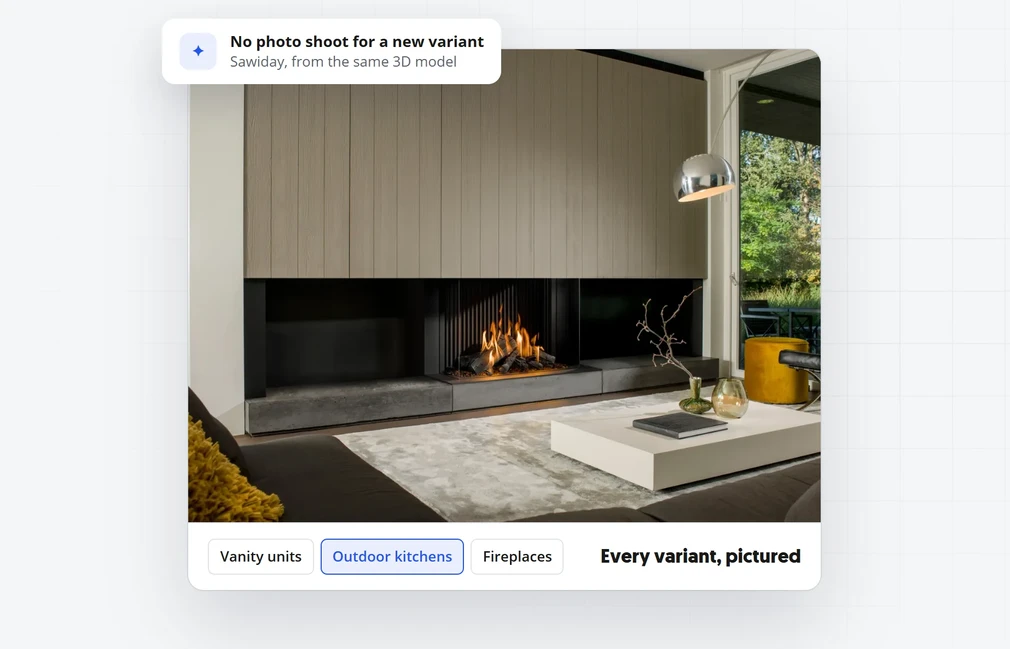
Fireplace in a living room with buttons to switch between variants

How an image is made

Every image starts from one 3D model.

Model the product once.
Each configuration gets its own image from there, so a new finish or size never waits for a photographer.
A 3D model as a wireframe (drawing)

01 · 3D model

Modeled once

Each product is modeled once in oneCORE. Our 3D artists can reuse your models from Maya, 3ds Max or Blender.

A render of the configured product (drawing)

02 · Render

Rendered per configuration

After configuration, an image is rendered in a render farm, so a high-quality image of exactly that product is always ready.

A Lusso outdoor kitchen in a garden

03 · AI

Refined, or in a real setting

AI refines the render into a product image for the webshop, or places the configured product in a real setting.

In production

Three kinds of image, in production today.

Bathroom vanity with a stone washbasin
Product images straight from 3D.

Sawiday's own Saniclass vanity range comes in many sizes, colors and finishes: too many to photograph. oneCORE renders every variant from the 3D model, and AI refines the render into a product image for the webshop.

Read the story

  • 3D renders
  • AI product images
  • One model, online and in the showroom
Render of a covered patio with an outdoor kitchen next to a pool
The kitchen, in a real setting.

Customers build their outdoor kitchen in 3D, module by module. AI turns the configuration into a lifestyle image, so they see their kitchen in a real setting, right in the quote.

Read the story

  • 3D product configurator
  • AI lifestyle images
  • Automatic PDF quote
Modern fireplace in a living room
The fireplace, in a room.

Barbas sells wood and gas fireplaces through dealers. AI images show the configured fireplace in a room, ready for visual selling.

Read the story

  • AI images
  • Dealer portal
  • 3D product configurator

Image pre-sets

Sharp on every screen and fast on every page.

An image uploaded bigger than its frame slows the page down. oneCORE links every image to pre-sets, made for the page layout, the place on the page and the image container.

Each image has several pre-sets, so it fits one, two or three products per row, on mobile, tablet and desktop. No manual resizing.

Image pre-sets

  • The right size for every container
  • Faster loading pages
  • Image and product tagging
Product images of a bathroom cabinet in several variants

Customer story · Bathroom

One 3D model per vanity, an image per variant.

Each Saniclass vanity is modeled once in oneCORE. Every variant gets its image from that model, refined with AI, and the same 3D configurator runs online and in Sawiday's showrooms. A new finish or size goes online without a photo shoot.

Two men sitting on a bathtub in front of a glass building

Related

Related solutions.

Product configurators

Visualize

Customers build it themselves, in 3D, with the price.

Explore →

3D visualization

Visualize

Your product in 3D, changing with every option.

Try it →

Visual selling

Visualize

Sell with 3D in the showroom and at the table.

Explore →

Document generation

Automate

The image goes straight into the quote.

Explore →

Questions

Images and oneCORE.

Put every variant you make online.

Book a 30-minute demo, or try a configurator in 3D first.