Dealers configure, price and order in 3D.

Your dealers and sales partners get a portal of their own, on your products, rules and prices. Barbas' dealers order there, and each order goes straight into its ERP.
  • Fixed prices, or each dealer their own
  • Paid immediately or on account
  • Dealer orders in the same flow as your webshop
Dealer order of a made-to-measure dining table with the customer price and dealer price

Per dealer

The same table, on each dealer's own terms.

Pick a dealer to see what changes. The dealers and terms are examples.

Diagram: dealer A configures in 3D and orders on account in your portal
Your prices, the same in every showroom.

Customers pay the same price whichever dealer they buy from. Dealer A sees the consumer price and its own purchase price, orders with one click and pays on account.

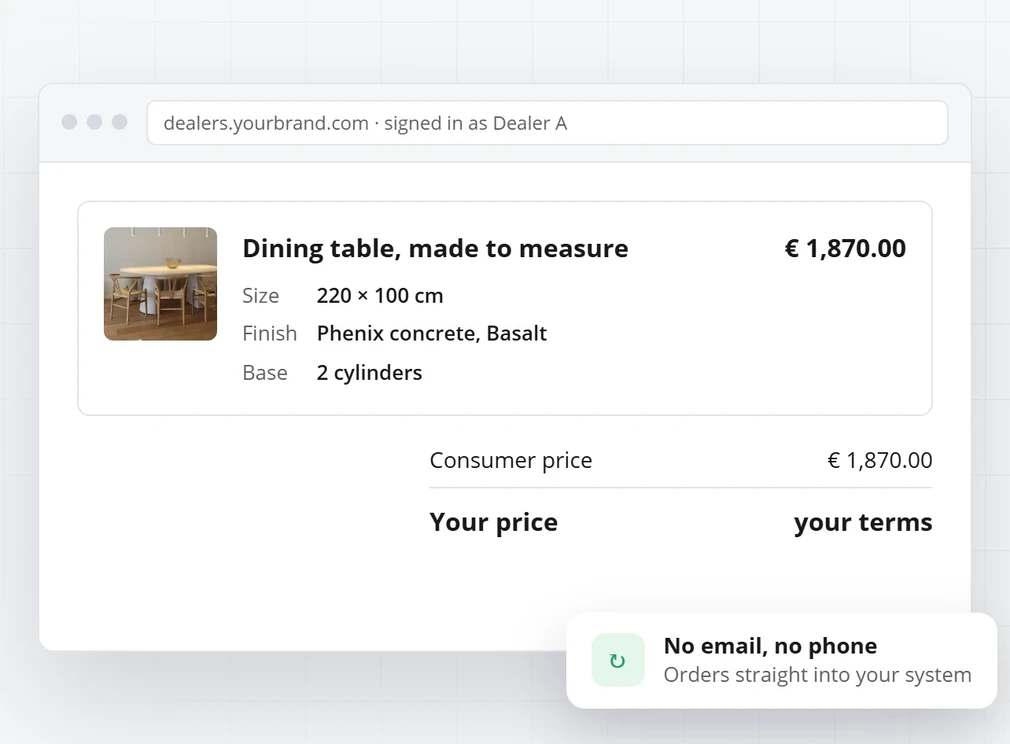
Diagram: an Excel price book is imported as CSV to give each dealer their own prices
Each dealer its own pricing strategy.

Dealer B works from its own price book in Excel, uploaded to the portal as a CSV file. Its customers see Dealer B's prices for the same configuration.

Diagram: dealer C configures and pays at once, and the order lands in your system
A new partner, ordering from day one.

Give a new partner a login and it can configure, price and order straight away, paying immediately until you agree terms. Nothing to build.

How it works

From a dealer's showroom to your workshop.

01

Partners order directly in the portal.

Dealers, sales partners and resellers configure your products in 3D and order directly in the portal. The price is there in real time, and the quote is automatic.

  • 3D configuration, with the price in real time
  • The dealer places the order directly
  • Immediate and on-account payment
Wooden slatted wall with a large plant in a pot

02

Fixed prices, or per dealer.

Set one price that customers pay wherever they buy, or let each dealer use its own pricing strategy. oneCORE has the tools for consistent, dynamic pricing of products and options.

  • Prices set in the portal
  • Dealer price books uploaded from Excel
  • Or prices from your ERP
Where dealer prices come from: the portal, an Excel price book and your ERP

03

A self-service screen in a busy showroom.

When your dealers' showrooms are busy, a screen lets customers configure their product themselves in 3D. The salesperson orders the configured product for them with one click.

  • A shorter, more efficient sales cycle
  • An automated quote process
  • The 3D product configurator on the screen
Bogard oval dining table with brown leather chairs

Customer story · Furniture

Dealer orders in the same flow as the webshop.

PUUUR sells its handmade furniture online, in two showrooms and through dealers. We helped reorganize the dealer network, and dealer orders now come in through the same platform as webshop orders, on one price structure.

Dark TV wall with lit display niches in a living room

Related

Related solutions.

Product configurators

Visualize

The 3D configurator your dealers work with.

Explore →

Quote automation

Automate

Quotes for your dealers' customers, automatically.

Explore →

ERP & PIM

Connect

Dealer orders straight into your ERP.

Explore →

Omnichannel selling

Use case

Online, in the showroom and through partners.

Explore →

Questions

Dealer portals.

A new dealer can order from day one.

Book a 30-minute demo, or try a configurator in 3D first.
