
Access after your approval.
Customers register and sign in with Google, Meta or Auth0, with a login you can style to your brand. You decide whether the portal, or only part of it, opens once you've approved the account.

See the portal features
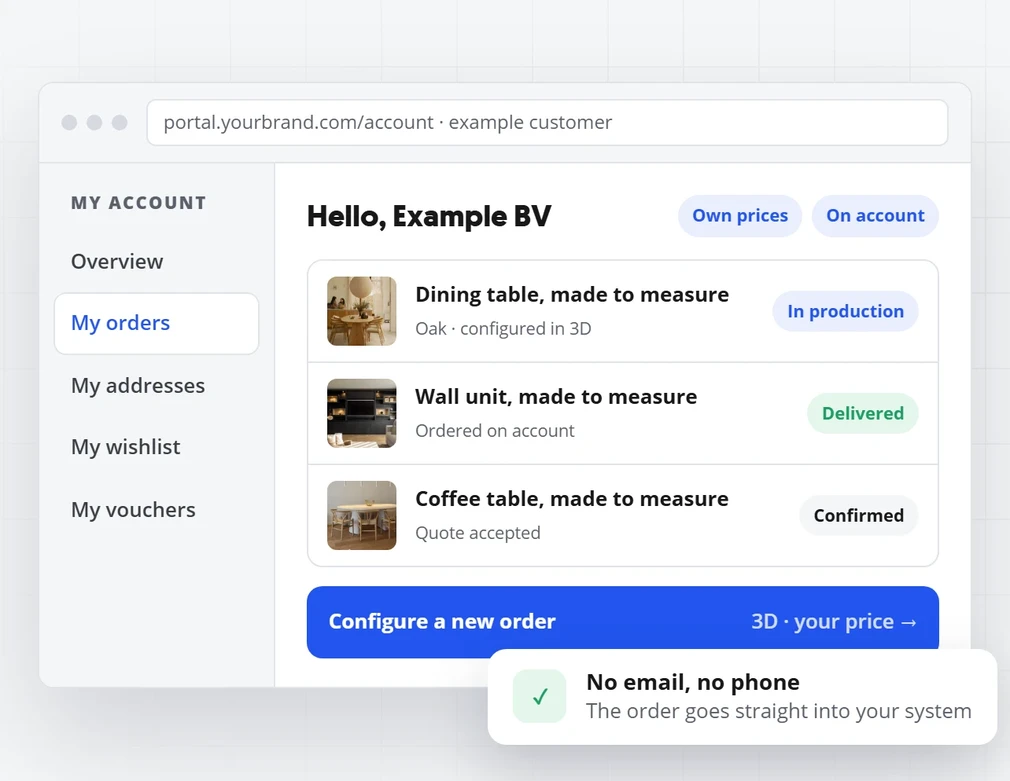
What a business customer sees depends on who they are. Pick a tab to see how oneCORE sets it up.
Customers register and sign in with Google, Meta or Auth0, with a login you can style to your brand. You decide whether the portal, or only part of it, opens once you've approved the account.

Give a customer specific discounts, hand out voucher codes, or reward them for reaching a revenue target. Prices can be set in the portal, uploaded from an Excel price book or come from your ERP.

Sort customers into groups with achievements, and make products or features visible only to the groups you choose. Give them by hand in the admin, or automatically with a Power Automate flow or a Cloudflare Worker.

Orders, addresses, wishlist and vouchers sit in the customer's account. With a data bridge, data from your ERP or another system comes in as JSON and shows up in their account too.
How it works
01
Your customers configure your products in 3D and order directly in the portal. The price is there in real time, so there is no quote to wait for.

02
Keep one price for everyone, or give each customer its own. The portal has the tools for consistent, dynamic pricing of products and options, and complex price structures run in oneCORE itself.

03
The more customers you have, the more it pays to automate. Repetitive actions, or actions set off by an event such as reaching a revenue or order goal, run as a Power Automate flow at customer level. Bigger jobs run on Cloudflare Workers.

Customer story · Furniture

Table du Sud's webshop, 3D configurator, sales dashboard and Account Connect run on oneCORE. As the company grew, the B2B customer portal Table du Sud FORME uses for business customers joined them on the same platform.

Related
Questions
Book a 30-minute demo, or try a configurator in 3D first.