
Sell made-to-order products on Shopify.
- No new webshop and no migration
- Prices from your price list or ERP
- The full configuration in the cart
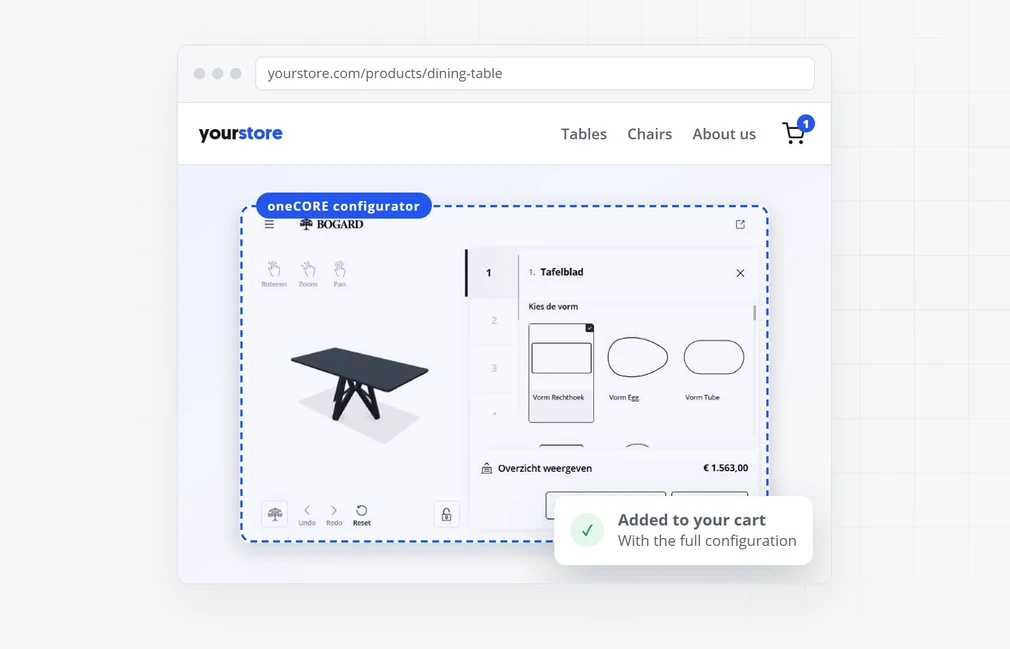
How it works
From your Shopify product page to the cart.
01
Your store, your theme.
The configurator sits on your own product pages and follows your design. Customers stay in your store from the first choice to the order.
- On your own product pages
- Follows your theme
- From the first choice to the order in your store

02
Every choice priced by your own rules.
Every option and every measurement is priced by your own rules, from a price list or your ERP. The customer sees the right price at every step. Glass Inside's configurator runs on its own Excel price list.
- Your price list, your ERP or oneCORE itself
- Rules decide which options fit together
- No surprises at checkout

03
Straight into the Shopify cart.
One click puts the configured product in the cart, with the full configuration. Your customers check out the way they know, and the order arrives ready for production.
- One click to the cart
- Every choice on the order line
- Your checkout, your payment

Try the flow with a Bogard table.
Try it
On our WooCommerce page you design a table with Bogard's own options and prices and add it to the cart. In Shopify the configurator works the same way.

Related
Related solutions.
Questions
Shopify and oneCORE.
Your Shopify store, ready for configured orders.
Book a 30-minute demo and we'll show you oneCORE inside the store you run.